
← mancan.digital
Product · macOS capture & recording

Cenna

Native speed. Without native limits.

A lightweight macOS menu bar app for screenshots and screen recording — native capture, real customization, and memory discipline most tools lack.

Free · macOS 13+

First launch: right-click Cenna in Applications → Open (the app isn't notarized yet — one time only). Full steps.

Demos & product tours Support & bug reports Docs & async updates
Cenna app icon

Most screenshot tools promise "simple capture," then keep a heavy pipeline alive in the background, decode huge images in-process, and turn ordinary screenshots into a memory event. Cenna takes the opposite approach.

It leans on macOS-native capture paths and keeps full-resolution screenshot data off the long-lived UI path, so it feels fast and stays realistic to keep running all day. Native where it matters, custom where it matters, efficient everywhere.

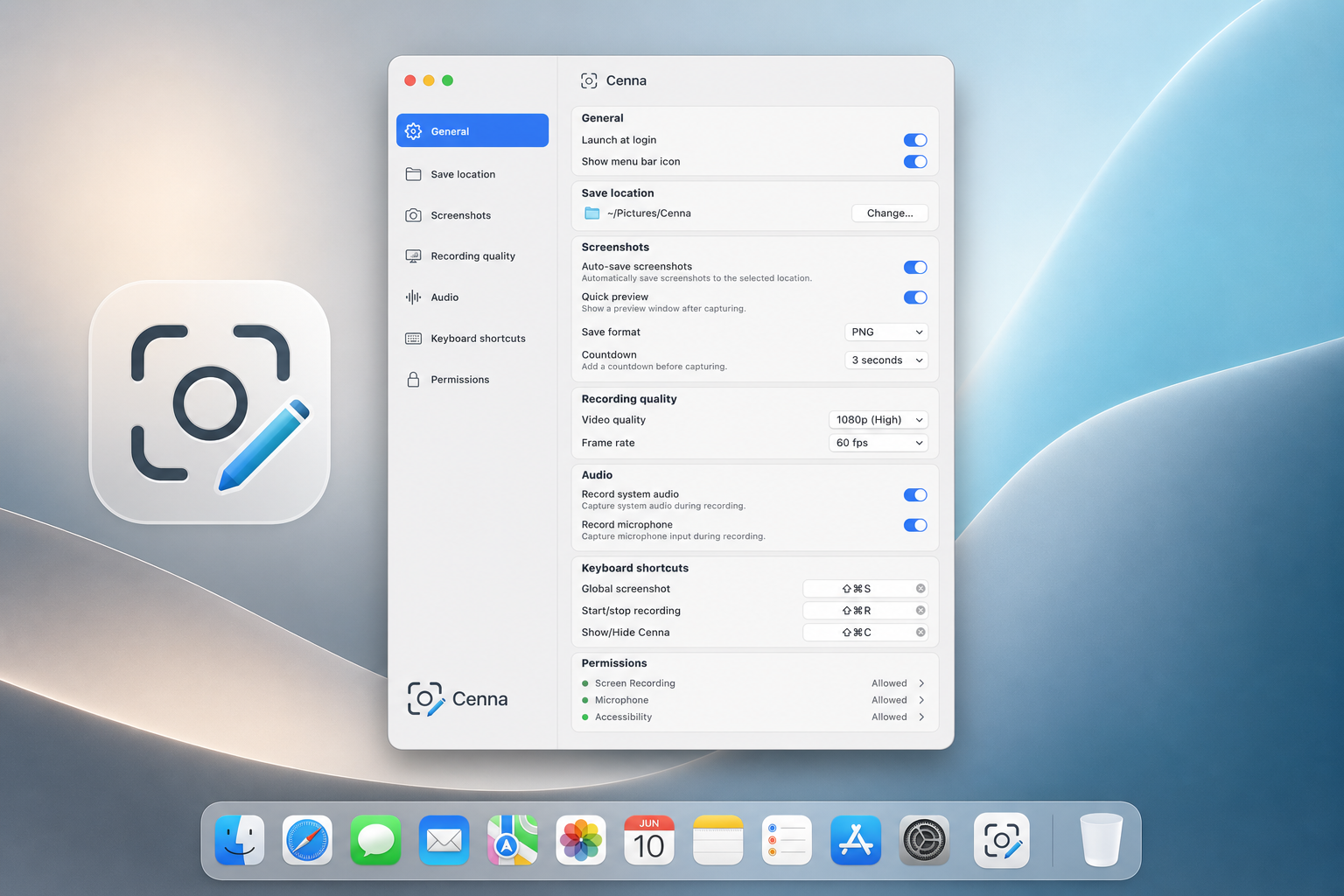
Cenna settings and capture workflow

Configurable capture, recording, and post-capture behavior from one menu bar app.

Features
  • Full-screen and interactive area capture
  • Built-in annotation editor: arrows, shapes, freehand
  • Post-capture choice: editor, quick preview, copy, or save
  • MP4 recording with system audio, mic, and webcam overlay
  • Timeline editor: split, trim, and speed up segments
  • Direct paths stay flat at ~15MB RAM, editor ~38MB
  • Global shortcuts, login item, configurable save folder
Memory discipline

Direct capture paths stay flat at ~15MB across an entire burst. The editor settles at ~38MB no matter how many shots run through it. Where many open-source tools sit in the hundreds of MB — and can exceed 1GB — Cenna stays lean.

Use cases
Best for: teams who want native macOS feel without bloated capture tools

Beyond Apple's defaults

Record full-screen MP4 with system audio, microphone, and a customizable webcam overlay — multiple sizes and shapes — so you appear on top of the video instead of recording screen and camera separately.

Quality you control

Pick 30 or 60 fps and 720p, 1080p, 1440p, or native resolution. Trade fidelity for dramatically lower memory when that is the right call.

Edit before you save

Split the timeline at the playhead, trim by deleting (and restoring) segments, and speed up slow sections with 1x–2x presets — per segment or all at once — with an export-accurate preview so what you see is what gets written.